
Import from Postman
Migrate your Postman collections to Yasumu.
Import from Postman
Yasumu supports importing Postman collections, allowing you to migrate your existing API definitions quickly.
Important Note
You need to create/open a Yasumu Workspace first before importing from Postman. Workspaces are just directories that Yasumu uses to store its entities. See Workspaces for more information.
How to Import
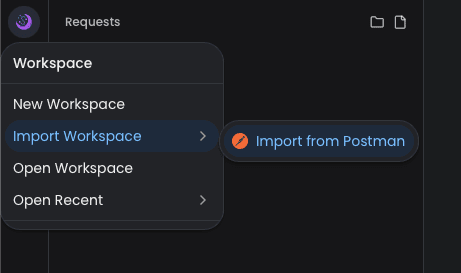
- Click on Workspace in the sidebar menu
- Select Import Workspace → Import from Postman
- In the import dialog, either:
- Drop a file — Drag and drop your Postman collection JSON file
- Browse — Click to select a file from your system
- Paste JSON — Paste the collection JSON content directly
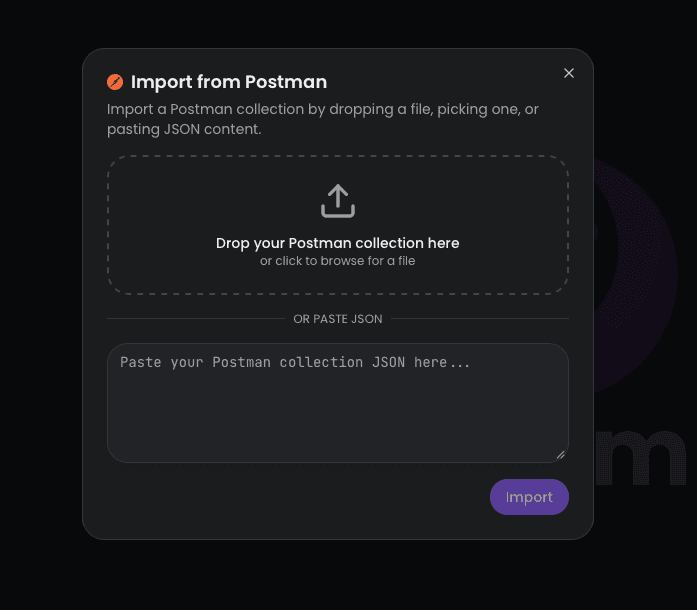
- Click Import to complete the migration
Importing Environment
You can simply load the environment json file in the same Postman import dialog shown above to import environment variables as well.
Supported Formats
Yasumu accepts Postman Collection v2.1 JSON exports. To export from Postman:
- Right-click on a collection in Postman
- Select Export
- Choose Collection v2.1 format
- Save the JSON file