
Workspaces
Understanding Yasumu workspaces and project organization.
Workspaces
A workspace in Yasumu is the core organizational unit for your API development workflow. It's a directory-based structure that lives alongside your source code, designed for collaboration and version control.
How Workspaces Work
When you open Yasumu on a project directory, it creates a yasumu
folder containing all your API definitions. This folder stores
everything in human-readable .ysl files that can be committed to
version control.
my-project/
├── src/
├── package.json
└── yasumu/
    ├── workspace.ysl
    ├── environment/
    │   ├── h49ehcz1o96rglpym0qjqr3a.ysl
    │   └── z85bde4ytdta7d1u0ndjfoh6.ysl
    ├── rest/
    │   ├── wmz1pu98ovohr1k44dbldpjt.ysl
    │   └── uaro9t8o2j31rufvghiyn4yr.ysl
    ├── smtp.ysl
    └── yasumu-lock.json
File Naming Convention
Yasumu uses unique IDs for file names (e.g.,
wmz1pu98ovohr1k44dbldpjt.ysl). The human-readable names are stored
inside the files in the metadata block. This approach:
- Avoids file name conflicts
- Prevents issues with special characters
- Makes renaming entities simple (only file contents change)
Workspace Configuration
The workspace.ysl file contains the core workspace configuration:
@workspace

metadata {
  id: "9qh64om0zya1lp9ejcgrh3rq"
  name: "my-project"
  version: 0
}

snapshot 1766908485545

groups {}
Configuration Fields
| Field | Description |
|---|---|
id | Unique identifier for the workspace |
name | Display name for the workspace |
version | Workspace schema version |
snapshot | Timestamp of last modification |
groups | Request grouping configuration |
Lock File
The yasumu-lock.json file tracks all entities in the workspace:
{
  "version": 1,
  "entities": {
    "workspace": { ... },
    "rest": { ... },
    "environment": { ... },
    "smtp": { ... },
    "group": {}
  }
}
Each entity entry contains:
hash— Content hash for change detectionlastSyncedAt— Timestamp of last synchronization
Git Integration
Workspaces are designed to be committed alongside your source code:
Benefits of Version Control
- Collaboration — Team members can pull and see updated API definitions immediately
- History — Track changes to API configurations over time
- Code Review — Diff-friendly text files make reviewing changes straightforward
- Branching — Test different API configurations on feature branches
Commit Everything
Commit the entire yasumu folder to version control. The .ysl
format is designed to be human-readable and produce clean diffs.
Default Workspace
Yasumu includes a built-in Default Workspace that serves as a scratchpad for quick experiments and testing. This workspace:
- Cannot be removed — It's always available as a fallback workspace
- Cannot be synchronized — Unlike regular workspaces, it's not backed by the file system
- Ideal for quick tests — Use it when you don't need persistence or version control
The Default Workspace is perfect for one-off API calls or experimenting before committing to a project-specific workspace.
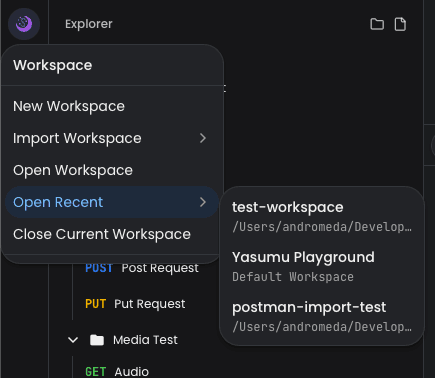
Multiple Workspaces
You can have multiple Yasumu workspaces:
- Per-project workspaces — Each project has its own
yasumufolder - Shared workspaces — A central workspace for cross-project APIs
- Team workspaces — Shared via Git for team collaboration
Switch between workspaces using the workspace menu in the sidebar:
Best Practices
- Commit your workspace — Include the entire
yasumufolder in version control - Use environments — Separate configurations for dev, staging, and production
- Use variables — Avoid hardcoding URLs and credentials
- Keep secrets secure — Secret values are stored empty in
.yslfiles, actual values are kept locally