
Scripting
Pre-request and post-response scripting in Yasumu.
Scripting
Yasumu provides a powerful scripting system that allows you to modify
requests before they're sent and process responses after they're
received. Scripts are written in JavaScript or TypeScript and have
access to request, response, and environment data.
Scripting Language
Yasumu supports both JavaScript and TypeScript syntax for
scripting out-of-the-box. The editor also provides type definitions
and autocomplete for the request and response objects.
Overview
Each request in Yasumu can have a script that exports two lifecycle functions:
onRequest(req)— Runs before the request is sentonResponse(req, res)— Runs after the response is received
Looking for e-mail scripting?
Please refer to the E-mail Scripting guide for detailed overviews on how to add email listener in Yasumu.
Script Structure
Scripts are written in the Scripts tab of the request editor:
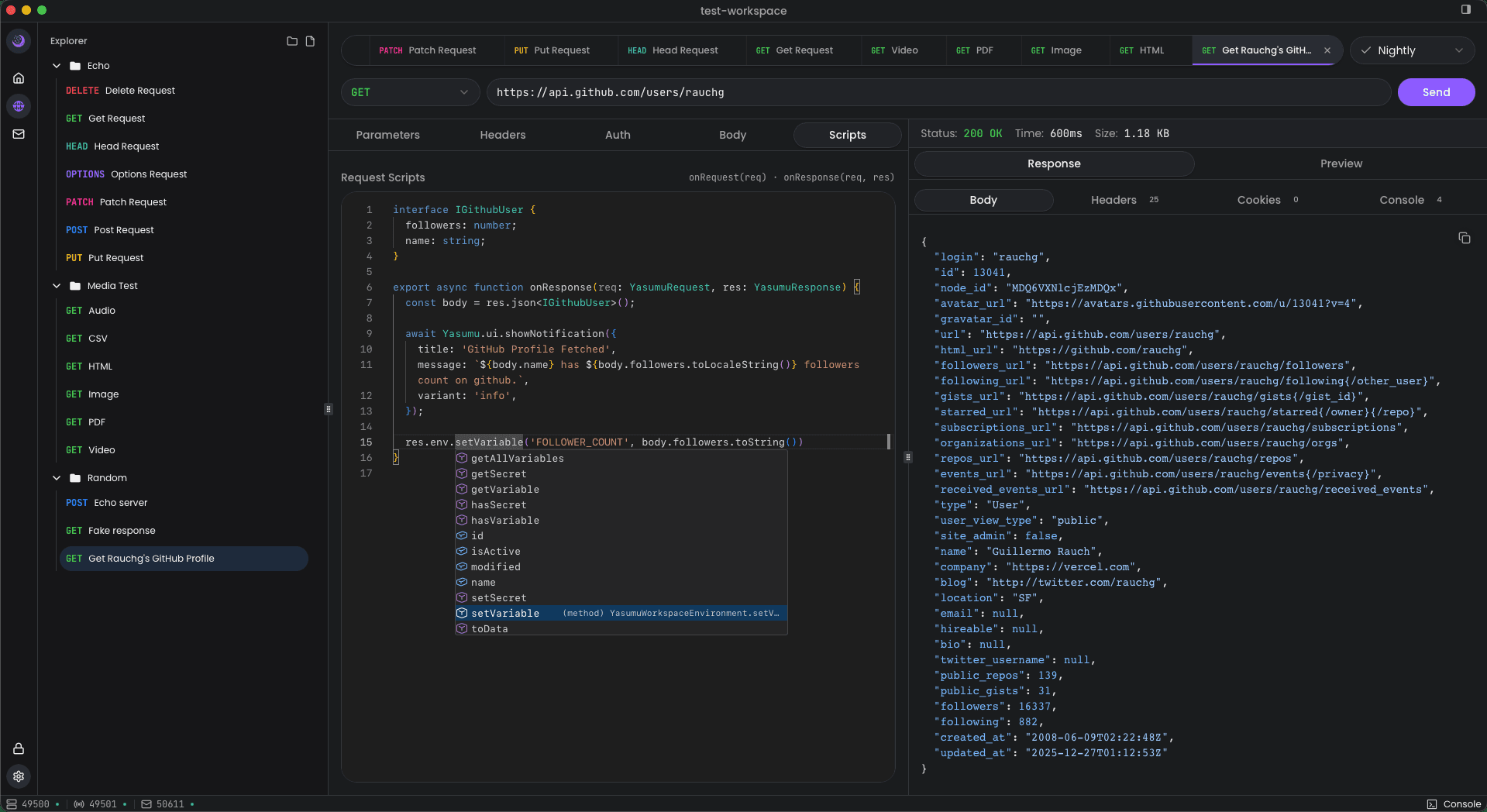
export function onRequest(req) {
  // Modify the request before sending
  req.headers.set('X-Custom-Header', 'value');
}

export function onResponse(req, res) {
  // Process the response
  console.log('Status:', res.status);
  console.log('Body:', res.json());
}
Optional Functions
Both functions are optional. You can export just onRequest, just
onResponse, or both depending on your needs.
The Request Object (req)
The req object represents the HTTP request and is available in both
onRequest and onResponse functions.
Properties
| Property | Type | Description |
|---|---|---|
url | string | The request URL (can be modified in onRequest) |
method | string | HTTP method (GET, POST, etc.) |
headers | YasumuHeaders | Request headers object |
body | unknown | Request body |
params | YasumuURLSearchParams | URL search parameters |
env | YasumuWorkspaceEnvironment | Environment access |
workspace | YasumuWorkspace | The current workspace object |
Methods
| Method | Returns | Description |
|---|---|---|
json() | unknown | Parse body as JSON |
text() | string | Get body as text |
clone() | YasumuRequest | Create a copy of the request |
Modifying Headers
export function onRequest(req) {
  // Set a header
  req.headers.set('Authorization', 'Bearer my-token');

  // Append to existing header
  req.headers.append('Accept', 'application/json');

  // Delete a header
  req.headers.delete('X-Unwanted');

  // Check if header exists
  if (req.headers.has('Content-Type')) {
    console.log('Content-Type:', req.headers.get('Content-Type'));
  }
}
Modifying URL and Method
export function onRequest(req) {
  // Change the URL
  req.url = 'https://api.example.com/v2/users';

  // Change the HTTP method
  req.method = 'POST';
}
Modifying Body
export function onRequest(req) {
  // Set a JSON body
  req.body = JSON.stringify({ name: 'John', age: 30 });
}
The Response Object (res)
The res object represents the HTTP response and is only available in
the onResponse function.
Properties
| Property | Type | Description |
|---|---|---|
status | number | HTTP status code |
statusText | string | HTTP status message |
ok | boolean | true if status is 200-299 |
headers | YasumuHeaders | Response headers |
body | unknown | Response body |
env | YasumuWorkspaceEnvironment | Environment access |
workspace | YasumuWorkspace | The current workspace object |
Methods
| Method | Returns | Description |
|---|---|---|
json() | unknown | Parse body as JSON |
text() | string | Get body as text |
clone() | YasumuResponse | Create a copy of the response |
Reading Response Data
export function onResponse(req, res) {
  // Check status
  if (!res.ok) {
    console.log('Request failed with status:', res.status);
    return;
  }

  // Read JSON body
  const data = res.json();
  console.log('User:', data.user);

  // Read headers
  const contentType = res.headers.get('Content-Type');
  console.log('Content-Type:', contentType);
}
Environment Access
Both req and res objects provide access to the current environment
through the env property.
Getting Variables and Secrets
export function onRequest(req) {
  // Get a variable
  const apiUrl = req.env.getVariable('API_URL');

  // Get a secret
  const apiKey = req.env.getSecret('API_KEY');

  // Use in headers
  req.headers.set('Authorization', `Bearer ${apiKey}`);
}
Setting Variables
You can set variables from scripts, which will be persisted to the environment:
export function onResponse(req, res) {
  const data = res.json();

  // Save a value from the response to the environment
  res.env.setVariable('AUTH_TOKEN', data.token);
  res.env.setVariable('USER_ID', data.user.id);
}
Environment Persistence
Variables set via setVariable() are automatically saved to the
active environment after the script completes. This allows you to
chain requests and pass data between them.
Setting Secrets
export function onResponse(req, res) {
  const data = res.json();

  // Save a sensitive value as a secret
  res.env.setSecret('REFRESH_TOKEN', data.refreshToken);
}
Environment Methods
| Method | Description |
|---|---|
getVariable(key) | Get a variable value (returns null if not found) |
setVariable(key, value) | Set a variable value |
deleteVariable(key) | Delete a variable |
hasVariable(key) | Check if variable exists |
getSecret(key) | Get a secret value (returns null if not found) |
setSecret(key, value) | Set a secret value |
deleteSecret(key) | Delete a secret |
hasSecret(key) | Check if secret exists |
getAllVariables() | Get all variables as an object |
getAllSecrets() | Get all secrets as an object |
Mock Responses
You can return a YasumuResponse from onRequest to skip the actual
HTTP request and return a mock response:
export function onRequest(req) {
  // Return a mock response instead of making the actual request
  if (req.url.includes('/mock')) {
    return new YasumuResponse(
      JSON.stringify({ message: 'This is a mock response' }),
      {
        status: 200,
        headers: { 'Content-Type': 'application/json' },
      },
    );
  }
}
This is useful for:
- Testing without hitting the actual API
- Simulating error responses
- Development when the backend isn't available
Awaiting Emails
Yasumu offers a powerful API for programmatically awaiting incoming emails within your scripts. This functionality is particularly valuable for testing and development scenarios that require verification of email delivery as part of an automated workflow.
export async function onRequest(req: YasumuRequest) {
  // Wait for an email to arrive in the workspace's mailbox.
  // The predicate should return true for emails that match your criteria.
  // The optional timeout (in milliseconds) determines how long to wait.
  const email = await req.workspace.emails.awaitEmail(
    (email) => /* your predicate logic here */,
    /* timeout */ 30_000
  );
  console.log('Received email:', email);
  // Received email:
  // {
  //   id: '123',
  //   from: 'sender@example.com',
  //   to: 'recipient@example.com',
  //   subject: 'Test Email',
  //   text: 'This is a test email',
  //   html: '<p>This is a test email</p>',
  //   cc: null,
  //   unread: true,
  //   createdAt: 1715769600000,
  //   updatedAt: 1715769600000,
  // }
}

// It may also be added in the `onResponse` function to await an email after a request is made.
export async function onResponse(req: YasumuResponse) {
  const email = await req.workspace.emails.awaitEmail(
    (email) => /* your predicate logic here */,
    /* timeout */ 30_000
  );
  console.log('Received email:', email);
}
For detailed examples and advanced features, please refer to the dedicated E-mail Scripting guide.
Console Output
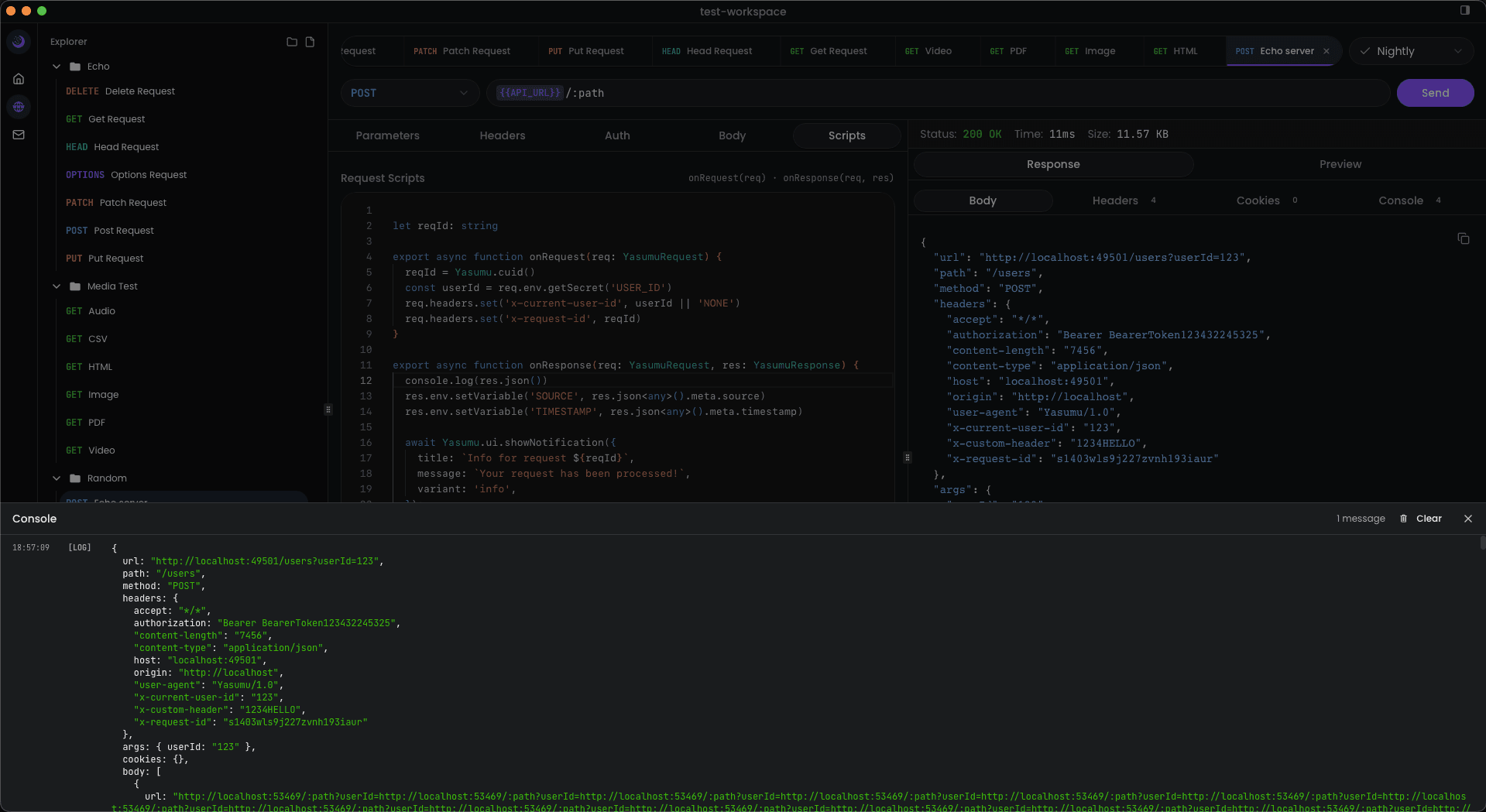
Use console.log() in your scripts to output debug information. The
output appears inside the Console section on the status bar, which
is available at the bottom right side of the screen.
export function onRequest(req) {
  console.log('Request URL:', req.url);
  console.log('Request Method:', req.method);
}

export function onResponse(req, res) {
  console.log('Response Status:', res.status);
  console.log('Response Body:', res.json());
}
Example of console
Runtime APIs
Yasumu scripts run in a Deno-based runtime, giving you access to modern JavaScript features and many Node.js/Deno APIs.
Web Standard APIs
These APIs are available in all modern JavaScript environments:
| API | Description |
|---|---|
crypto | Web Crypto API for hashing, encryption, etc. |
TextEncoder | Encode strings to Uint8Array |
TextDecoder | Decode Uint8Array to strings |
atob / btoa | Base64 encoding/decoding |
fetch | Make HTTP requests (use sparingly in scripts) |
URL / URLSearchParams | URL manipulation |
setTimeout / setInterval | Timers (async operations) |
JSON | JSON parsing and stringification |
console | Logging to the console tab |
Node.js APIs
You can import Node.js built-in modules using the node: prefix:
import { Buffer } from 'node:buffer';
import { createHash, createHmac } from 'node:crypto';
import path from 'node:path';

export function onRequest(req) {
  // Using Node.js Buffer
  const data = Buffer.from('Hello, World!', 'utf-8');
  const base64 = data.toString('base64');
  req.headers.set('X-Encoded', base64);

  // Using Node.js crypto
  const hash = createHash('sha256').update(req.url).digest('hex');
  req.headers.set('X-URL-Hash', hash);
}
Example of some of the available Node.js modules
| Module | Import | Description |
|---|---|---|
buffer | import { Buffer } from 'node:buffer' | Binary data handling |
crypto | import crypto from 'node:crypto' | Cryptographic functions |
path | import path from 'node:path' | Path manipulation |
util | import util from 'node:util' | Utility functions |
querystring | import qs from 'node:querystring' | Query string parsing |
url | import { URL } from 'node:url' | URL parsing |
assert | import assert from 'node:assert' | Assertions for testing |
Deno APIs
Deno-specific APIs are available through the global Deno object:
export function onRequest(req) {
  // Get environment variables (from system, not Yasumu env)
  const nodeEnv = Deno.env.get('NODE_ENV');
  console.log('NODE_ENV:', nodeEnv);

  // Check Deno version
  console.log('Deno version:', Deno.version.deno);
}
Permission System
Yasumu runs scripts in a sandboxed environment. When a script attempts to perform dangerous operations (like file system access), you'll be prompted to grant permission:
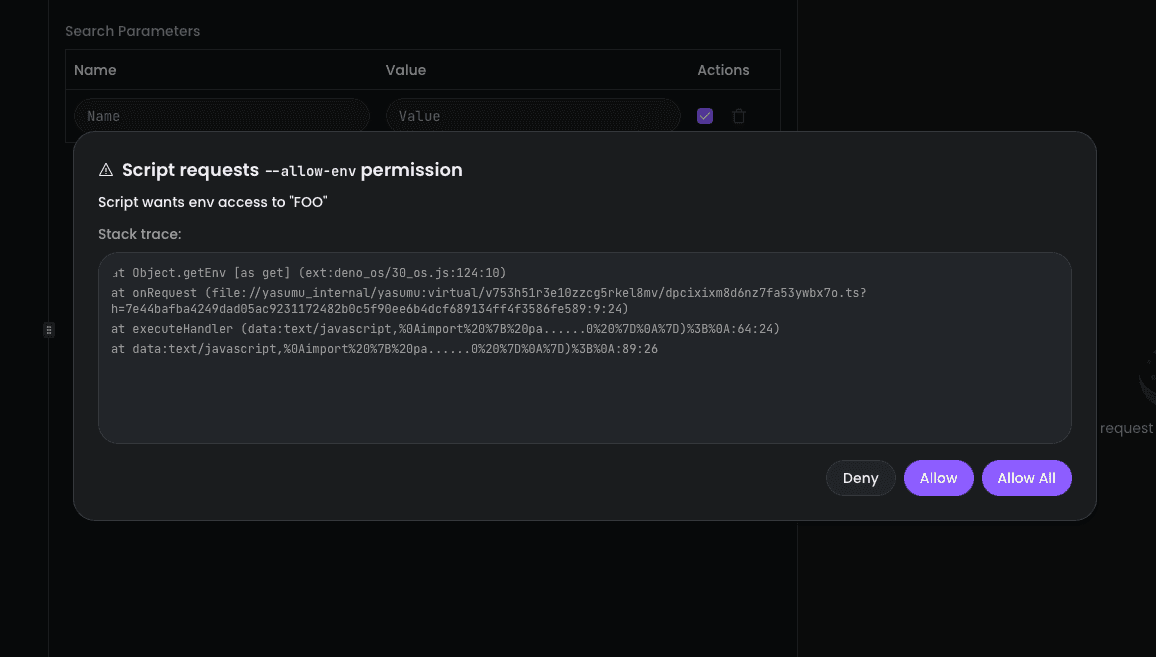
Example of some of the available Deno APIs
| API | Description |
|---|---|
Deno.version | Get Deno, V8, and TypeScript versions |
Deno.env.get(key) | Read system environment variables |
Deno.inspect(value) | Pretty-print any value for debugging |
Deno.noColor | Check if color output is disabled |
Yasumu-Specific APIs
Yasumu provides additional utilities through the global Yasumu
object:
| API | Description |
|---|---|
Yasumu.cuid() | Generate a collision-resistant unique identifier |
Yasumu.version | Get the current Yasumu version |
Yasumu.ui.showNotification() | Show a toast notification in the UI |
export function onRequest(req) {
  // Generate unique ID
  const id = Yasumu.cuid();
  req.headers.set('X-Request-ID', id);

  // Log Yasumu version
  console.log('Yasumu version:', Yasumu.version);
}
UI Notifications
You can display toast notifications in the Yasumu UI from your scripts:
export function onResponse(req, res) {
  if (res.ok) {
    await Yasumu.ui.showNotification({
      title: 'Success',
      message: 'Request completed successfully!',
      variant: 'success',
    });
  } else {
    await Yasumu.ui.showNotification({
      title: 'Error',
      message: `Request failed with status ${res.status}`,
      variant: 'error',
    });
  }
}
Notification Options
| Property | Type | Description |
|---|---|---|
title | string | The title of the notification |
message | string | The message body of the notification |
variant | string | Style variant: default, success, warning, info, error |
// Different notification variants
await Yasumu.ui.showNotification({
  title: 'Info',
  message: 'Processing your request...',
  variant: 'info',
});

await Yasumu.ui.showNotification({
  title: 'Warning',
  message: 'Rate limit approaching',
  variant: 'warning',
});
Cryptographic Operations
Use the Web Crypto API for secure hashing and encryption:
export async function onRequest(req) {
  const apiKey = req.env.getSecret('API_KEY');
  const timestamp = Date.now().toString();

  // Create HMAC signature
  const encoder = new TextEncoder();
  const keyData = encoder.encode(apiKey);
  const message = encoder.encode(
    `${req.method}:${req.url}:${timestamp}`,
  );

  const key = await crypto.subtle.importKey(
    'raw',
    keyData,
    { name: 'HMAC', hash: 'SHA-256' },
    false,
    ['sign'],
  );

  const signature = await crypto.subtle.sign('HMAC', key, message);
  const signatureHex = Array.from(new Uint8Array(signature))
    .map((b) => b.toString(16).padStart(2, '0'))
    .join('');

  req.headers.set('X-Timestamp', timestamp);
  req.headers.set('X-Signature', signatureHex);
}
Generating UUIDs
export function onRequest(req) {
  const requestId = crypto.randomUUID();
  req.headers.set('X-Request-ID', requestId);
}
Generating CUIDs
Yasumu provides a built-in method to generate collision-resistant unique identifiers (CUIDs):
export function onRequest(req) {
  const requestId = Yasumu.cuid();
  req.headers.set('X-Request-ID', requestId);
  console.log('Generated CUID:', requestId);
}
CUID vs UUID
CUIDs are shorter, URL-safe, and designed to be monotonically increasing, making them ideal for database IDs and distributed systems.
Hashing Data
export async function onResponse(req, res) {
  const body = res.text();
  const encoder = new TextEncoder();
  const data = encoder.encode(body);

  const hashBuffer = await crypto.subtle.digest('SHA-256', data);
  const hashArray = Array.from(new Uint8Array(hashBuffer));
  const hashHex = hashArray
    .map((b) => b.toString(16).padStart(2, '0'))
    .join('');

  console.log('Response SHA-256:', hashHex);
}
Base64 Encoding
export function onRequest(req) {
  const username = req.env.getVariable('USERNAME');
  const password = req.env.getSecret('PASSWORD');

  // Basic Auth header
  const credentials = btoa(`${username}:${password}`);
  req.headers.set('Authorization', `Basic ${credentials}`);
}
Async Functions
Scripts support async/await. If you use async APIs like
crypto.subtle, make sure to declare your function as async and
await the results.
Common Use Cases
Authentication
Add authentication headers dynamically:
export function onRequest(req) {
  const token = req.env.getSecret('AUTH_TOKEN');
  if (token) {
    req.headers.set('Authorization', `Bearer ${token}`);
  }
}
Token Refresh
Save tokens from login responses for use in subsequent requests:
export function onResponse(req, res) {
  if (res.ok && req.url.includes('/login')) {
    const data = res.json();
    res.env.setSecret('AUTH_TOKEN', data.accessToken);
    res.env.setSecret('REFRESH_TOKEN', data.refreshToken);
    console.log('Tokens saved to environment');
  }
}
Request Signing
Add signatures or timestamps to requests:
export function onRequest(req) {
  const timestamp = Date.now().toString();
  req.headers.set('X-Timestamp', timestamp);

  // Add a simple signature (in practice, use proper HMAC)
  const apiKey = req.env.getSecret('API_KEY');
  req.headers.set('X-Signature', btoa(`${apiKey}:${timestamp}`));
}
Response Validation
Validate responses and log warnings:
export function onResponse(req, res) {
  const data = res.json();

  if (!data.id) {
    console.warn('Response missing required field: id');
  }

  if (res.status === 401) {
    console.error('Authentication failed - token may be expired');
  }
}
Extracting Data for Chaining
Save response data for use in other requests:
export function onResponse(req, res) {
  const data = res.json();

  // Save the created resource ID for later requests
  res.env.setVariable('LAST_CREATED_ID', data.id);
  res.env.setVariable('LAST_CREATED_AT', data.createdAt);
}
Best Practices
- Keep scripts focused — Each script should do one thing well
- Use environment variables — Don't hardcode sensitive values in scripts
- Handle errors gracefully — Check for null values and error responses
- Use console.log for debugging — Output helps trace issues
- Document complex logic — Add comments for non-obvious code
- Test incrementally — Test scripts after each change