
Testing
Write and run tests for your API requests in Yasumu.
Testing
Yasumu includes a built-in testing framework that lets you write tests for your API requests. Tests run only in test mode, after a request completes and can validate response data, status codes, headers, and more.
Global APIs
The test, expect and describe functions are available globally
in your scripts. No imports needed.
Test Context Required
The test() and expect() functions only work inside the
onTest() function. Calling them in onRequest() or onResponse()
will have no effect as they are silently ignored in non-test mode.
Why Tests Live with Scripts
In Yasumu, tests are defined alongside your request scripts in the same file. This is a deliberate design choice that differs from tools like Postman, where tests are often managed separately or in different tabs.
The Unified Script Model
Yasumu uses a single script file per request with three lifecycle functions:
onRequest— Modify the request before sendingonResponse— Process the response after receivingonTest— Validate the response with assertions
export function onRequest(req) {
  req.headers.set(
    'Authorization',
    `Bearer ${req.env.getSecret('TOKEN')}`,
  );
}

export function onResponse(req, res) {
  res.env.setVariable('USER_ID', res.json().id);
}

export function onTest(req, res) {
  test('should return user', () => {
    expect(res.json().id).toBeDefined();
  });
}
Benefits of This Approach
| Benefit | Description |
|---|---|
| Single Source of Truth | Everything about your request—including tests—lives together. No context-switching, no forgotten test files. |
| Maximum Reusability | Easily share functions, values, and objects between your request logic and your tests. |
| Rich Shared Context | Tests receive the same req (request) and res (response) objects used throughout the script, ensuring full context. |
| Better Version Control | Keeping everything in one file means smaller, more focused diffs and easier code reviews. |
| Seamless Portability | Clone a request and its tests just come along—no hunting for corresponding files or missing assertions. |
| Effortless Discoverability | New contributors and teammates always find tests exactly where they expect: beside the request logic itself. |
| Reduced Drift | Tests are always in sync with the code they verify, so they don’t become outdated or disconnected from script changes. |
Familiar Testing API
Yasumu uses the similar testing API as Jest, Vitest, and other popular JavaScript testing frameworks. If you've written tests in any modern JS project, you already know how to write tests in Yasumu:
// Yasumu - uses standard Jest/Vitest API
export function onTest(req, res) {
  test('should return user', () => {
    expect(res.json().name).toBe('John');
    expect(res.status).toBeGreaterThanOrEqual(200);
  });
}
Compare this to Postman's proprietary API:
// Postman - uses custom pm.* API
pm.test('should return user', function () {
  const json = pm.response.json();
  pm.expect(json.name).to.eql('John');
  pm.expect(pm.response.code).to.be.at.least(200);
});| Aspect | Yasumu | Postman |
|---|---|---|
| API Style | Jest/Vitest (expect().toBe()) | Chai-like (pm.expect().to.eql()) |
| Learning Curve | Familiar if you know Jest | Requires learning pm.* APIs |
| Transferable Skills | Yes — same patterns as unit tests | No — Postman-specific knowledge |
Comparison with Other Tools
In Postman, tests are written in a separate "Tests" (or
Post-Response Script) tab using a different API (pm.test,
pm.expect). Since pre-request and test scripts are managed
independently, which can lead to:
- Duplicated setup logic between pre-request and test scripts
- Context switching when debugging request flows
- Tests that drift out of sync with the request they validate
Overview
Tests are defined in the onTest function within your request script.
This function receives req and res as arguments — the same objects
used in onRequest and onResponse — giving you full access to both
request and response data.
export function onTest(req, res) {
  test('should return 200 status', () => {
    expect(res.status).toBe(200);
  });

  test('should return valid JSON', () => {
    const data = res.json();
    expect(data).toBeDefined();
  });
}
Writing Tests
Basic Test Structure
Each test is defined using the test function with a name and a
callback:
export function onTest(req, res) {
  test('test name', () => {
    // Your assertions here
  });
}
The onTest function receives the same req and res objects used
throughout the script, so you can reference them directly in your
tests via closure.
Function Arguments
| Argument | Type | Description |
|---|---|---|
req | YasumuRequest | The request object |
res | YasumuResponse | The response object |
Accessing Response Data
export function onTest(req, res) {
  test('response body is valid', () => {
    const body = res.json();
    expect(body.name).toBe('John');
    expect(body.email).toContain('@');
  });

  test('status is successful', () => {
    expect(res.status).toBe(200);
    expect(res.ok).toBe(true);
  });

  test('content-type is JSON', () => {
    const contentType = res.headers.get('Content-Type');
    expect(contentType).toContain('application/json');
  });
}
Accessing Request Data
export function onTest(req, res) {
  test('request was sent with correct method', () => {
    expect(req.method).toBe('POST');
  });

  test('request URL is correct', () => {
    expect(req.url).toContain('/api/users');
  });
}
Grouping Tests
Use describe to group related tests together:
export function onTest(req, res) {
  describe('User Response', () => {
    test('has user id', () => {
      const user = res.json();
      expect(user.id).toBeDefined();
    });

    test('has user email', () => {
      const user = res.json();
      expect(user.email).toBeDefined();
    });
  });

  describe('Response Headers', () => {
    test('has content-type', () => {
      expect(res.headers.has('Content-Type')).toBe(true);
    });

    test('has cache-control', () => {
      expect(res.headers.has('Cache-Control')).toBe(true);
    });
  });
}
Test Context
Each test function receives a ctx object with methods to control
test execution:
| Method | Description |
|---|---|
ctx.skip() | Skip the current test |
ctx.fail(message) | Explicitly fail with an optional message |
ctx.succeed() | Explicitly pass and exit early |
Skipping Tests
Use ctx.skip() to conditionally skip a test:
export function onTest(req, res) {
  test('only run in production', (ctx) => {
    const env = req.env.getVariable('ENVIRONMENT');
    if (env !== 'production') {
      ctx.skip();
    }

    expect(res.status).toBe(200);
  });
}
Skipped tests are marked as skip in the test results rather than
pass or fail.
Failing Tests Explicitly
Use ctx.fail() to explicitly fail a test with a custom message:
export function onTest(req, res) {
  test('should have valid token', (ctx) => {
    const token = res.headers.get('X-Auth-Token');
    if (!token) {
      ctx.fail('Missing authentication token');
    }

    expect(token).toMatch(/^[a-zA-Z0-9]+$/);
  });
}
Early Success
Use ctx.succeed() to pass a test early and skip remaining
assertions:
export function onTest(req, res) {
  test('should handle optional field', (ctx) => {
    const data = res.json();

    // If field is missing, that's acceptable
    if (!data.optionalField) {
      ctx.succeed();
    }

    // Only validate if the field exists
    expect(data.optionalField).toMatch(/^[A-Z]+$/);
  });
}
Assertions
The expect function provides a rich set of matchers for assertions.
It uses the same API as Jest and Vitest.
Common Matchers
| Matcher | Description |
|---|---|
toBe(value) | Strict equality (===) |
toEqual(value) | Deep equality for objects/arrays |
toBeDefined() | Not undefined |
toBeUndefined() | Is undefined |
toBeNull() | Is null |
toBeTruthy() | Truthy value |
toBeFalsy() | Falsy value |
toContain(item) | Array/string contains item |
toHaveLength(n) | Array/string has length n |
toBeGreaterThan(n) | Number is greater than n |
toBeLessThan(n) | Number is less than n |
toMatch(regex) | String matches regex |
toThrow() | Function throws an error |
Examples
export function onTest(req, res) {
  test('equality checks', () => {
    const data = res.json();

    // Strict equality
    expect(data.status).toBe('active');

    // Deep equality for objects
    expect(data.user).toEqual({
      id: 1,
      name: 'John',
    });
  });

  test('truthiness checks', () => {
    const data = res.json();

    expect(data.enabled).toBeTruthy();
    expect(data.deleted).toBeFalsy();
    expect(data.id).toBeDefined();
  });

  test('number comparisons', () => {
    const data = res.json();

    expect(data.count).toBeGreaterThan(0);
    expect(data.items.length).toBeLessThanOrEqual(100);
  });

  test('string matching', () => {
    const data = res.json();

    expect(data.email).toContain('@');
    expect(data.email).toMatch(/^[\w.-]+@[\w.-]+\.\w+$/);
  });

  test('array checks', () => {
    const data = res.json();

    expect(data.items).toHaveLength(5);
    expect(data.tags).toContain('important');
  });
}
Negating Matchers
Use .not to negate any matcher:
export function onTest(req, res) {
  test('negative assertions', () => {
    const data = res.json();

    expect(data.error).not.toBeDefined();
    expect(data.status).not.toBe('error');
    expect(data.items).not.toHaveLength(0);
  });
}
Async Tests
Test functions can be async if you need to perform async operations:
export function onTest(req, res) {
  test('async validation', async () => {
    const data = res.json();

    // Async operations are supported
    const hash = await computeHash(data.token);
    expect(hash).toBeDefined();
  });
}
Test Results
After running tests, Yasumu displays results for each test:
| Result | Description |
|---|---|
pass | Test passed successfully |
fail | Test failed with an error |
skip | Test was skipped |
Each test result includes:
- Test name — The name you provided
- Result — pass, fail, or skip
- Duration — How long the test took
- Error — Error message if the test failed
Test Results View
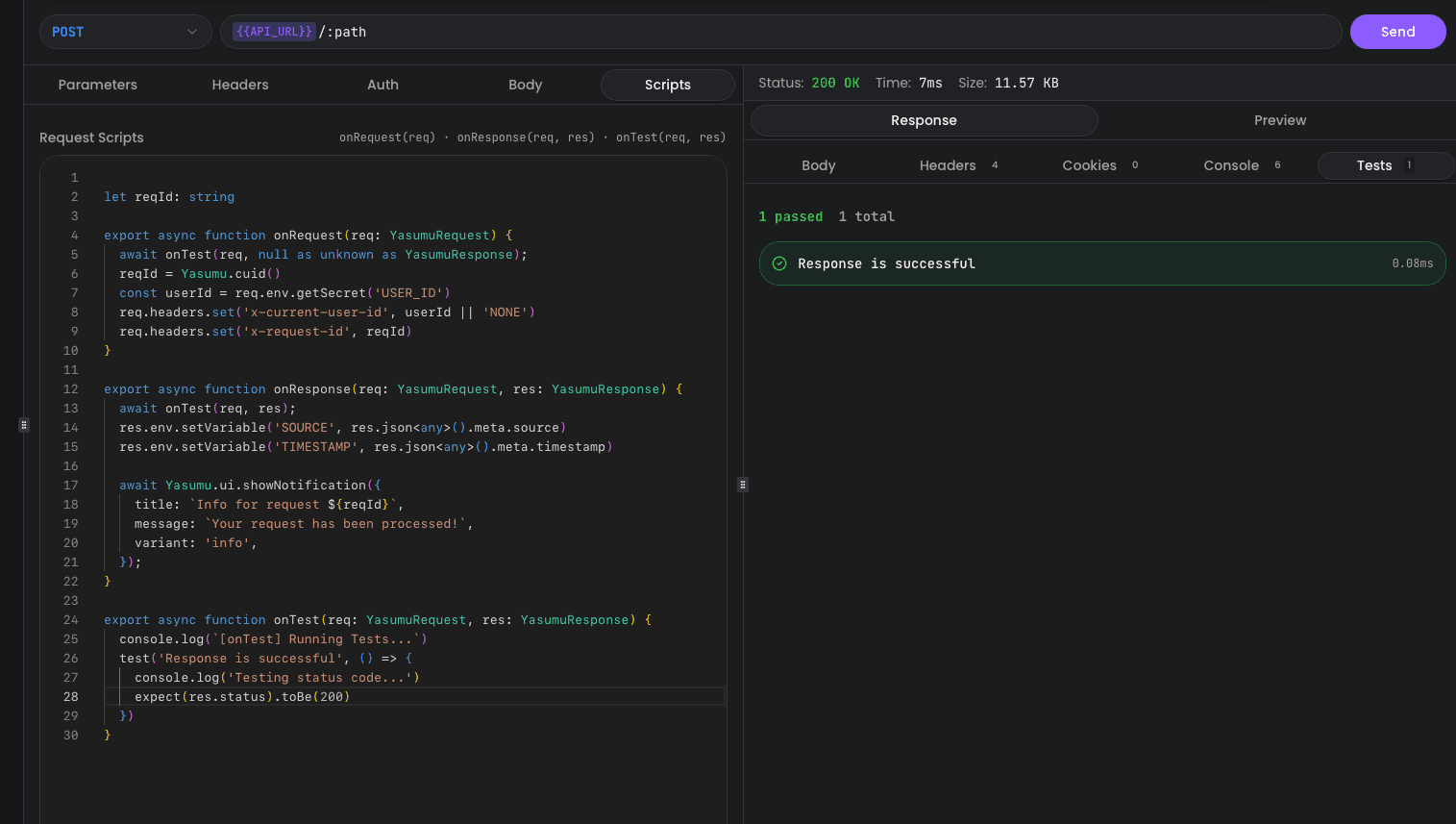
The Tests tab displays a summary of all test results with color-coded icons:
Console View
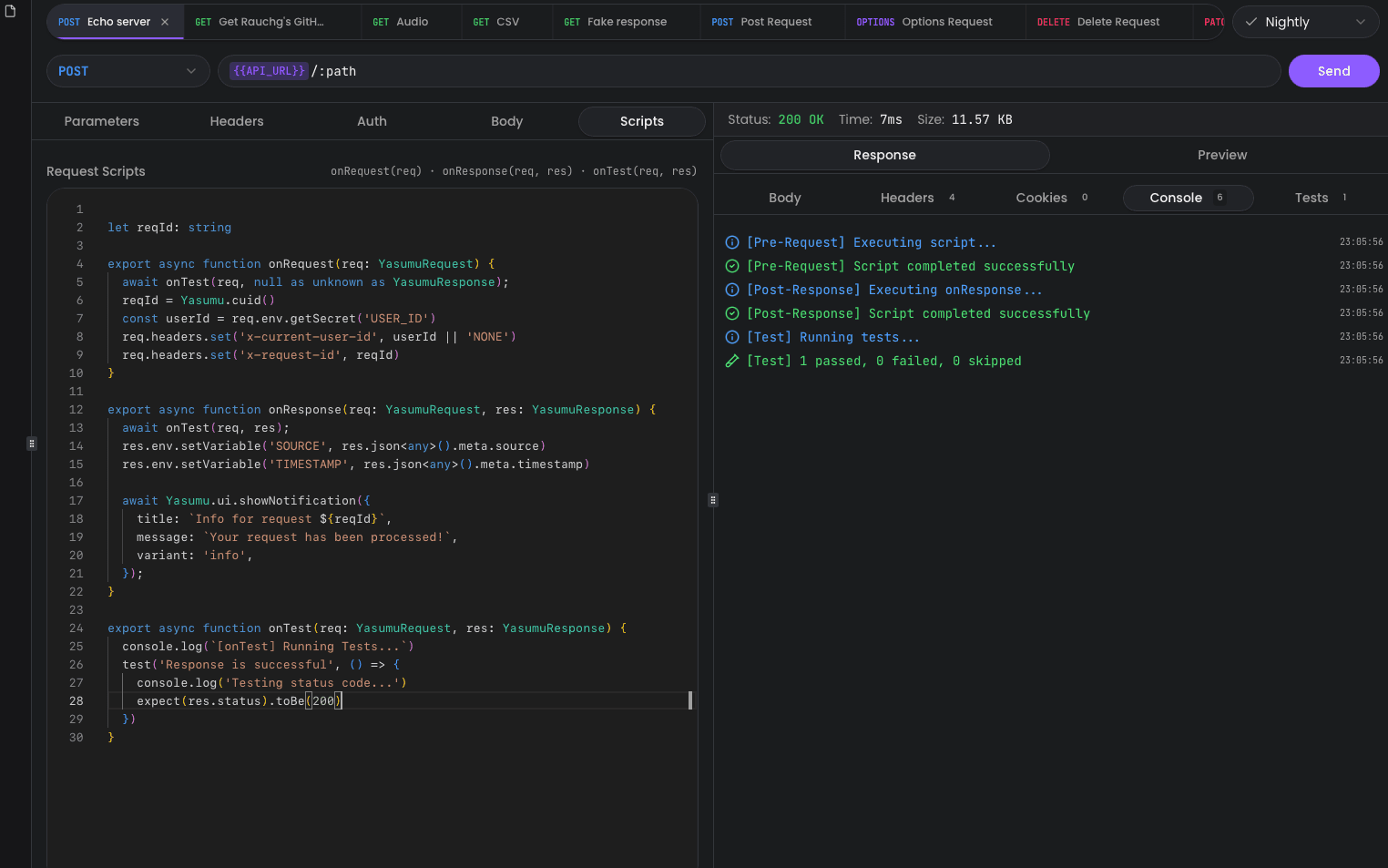
The Console tab shows detailed script execution logs with timestamps and color-coded status messages:
Tests Only Run in onTest
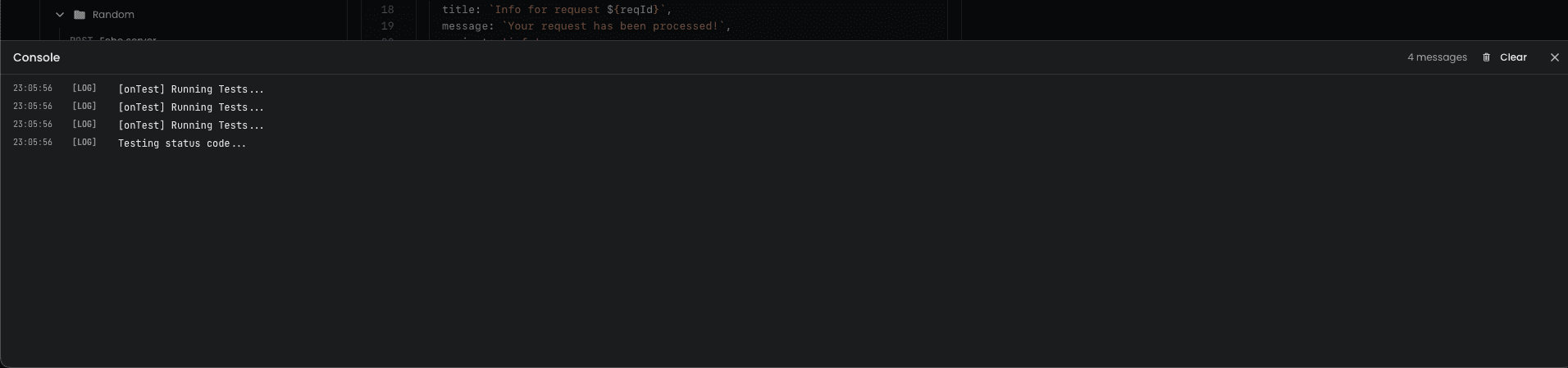
If you accidentally call onTest() inside onRequest or
onResponse, it will only produce log output — no tests are
actually executed. This is by design to ensure tests only run in
test mode.
Complete Example
Here's a comprehensive example testing a user API endpoint:
export function onRequest(req) {
  req.headers.set(
    'Authorization',
    `Bearer ${req.env.getSecret('API_TOKEN')}`,
  );
}

export function onResponse(req, res) {
  if (res.ok) {
    const data = res.json();
    res.env.setVariable('LAST_USER_ID', data.id);
  }
}

export function onTest(req, res) {
  describe('Response Status', () => {
    test('returns 200 OK', () => {
      expect(res.status).toBe(200);
      expect(res.ok).toBe(true);
    });

    test('has correct content-type', () => {
      const contentType = res.headers.get('Content-Type');
      expect(contentType).toContain('application/json');
    });
  });

  describe('User Data', () => {
    test('has required fields', () => {
      const user = res.json();

      expect(user.id).toBeDefined();
      expect(user.name).toBeDefined();
      expect(user.email).toBeDefined();
    });

    test('email is valid format', () => {
      const user = res.json();

      expect(user.email).toMatch(/^[\w.-]+@[\w.-]+\.\w+$/);
    });

    test('timestamps are present', () => {
      const user = res.json();

      expect(user.createdAt).toBeDefined();
      expect(user.updatedAt).toBeDefined();
    });
  });

  describe('Response Performance', () => {
    test('response time is acceptable', (ctx) => {
      // Skip if not in production
      const env = req.env.getVariable('ENVIRONMENT');
      if (env !== 'production') {
        ctx.skip();
      }

      // Custom performance check could be added here
      expect(res.ok).toBe(true);
    });
  });
}
Best Practices
- Write descriptive test names — Make it clear what each test validates
- One assertion per test — Keep tests focused for clearer failure messages
- Use
describefor organization — Group related tests together - Test edge cases — Include tests for error responses and edge cases
- Use
ctx.skip()wisely — Skip tests that don't apply to the current context - Keep tests fast — Avoid heavy computations in tests
Test Execution
Tests run synchronously in the order they're defined. The onTest
function is called after onResponse completes.